Unpend withdraws the invitations nobody answered, removes the connections you no longer need and clears the requests waiting on you. Paced safely, entirely in your browser.
Unpend runs in Chrome, Edge and Brave on a computer. Open this page on your laptop to install it.
Why it matters
Pending invitations sit for up to six months, reflect a low acceptance rate and stop you from inviting those people again.
Past clients, old colleagues and event adds fill your feed with people you no longer follow closely. LinkedIn has no bulk remove at any price.
Received invitations stack up while LinkedIn makes you accept or ignore them one screen at a time.
Everything in one extension
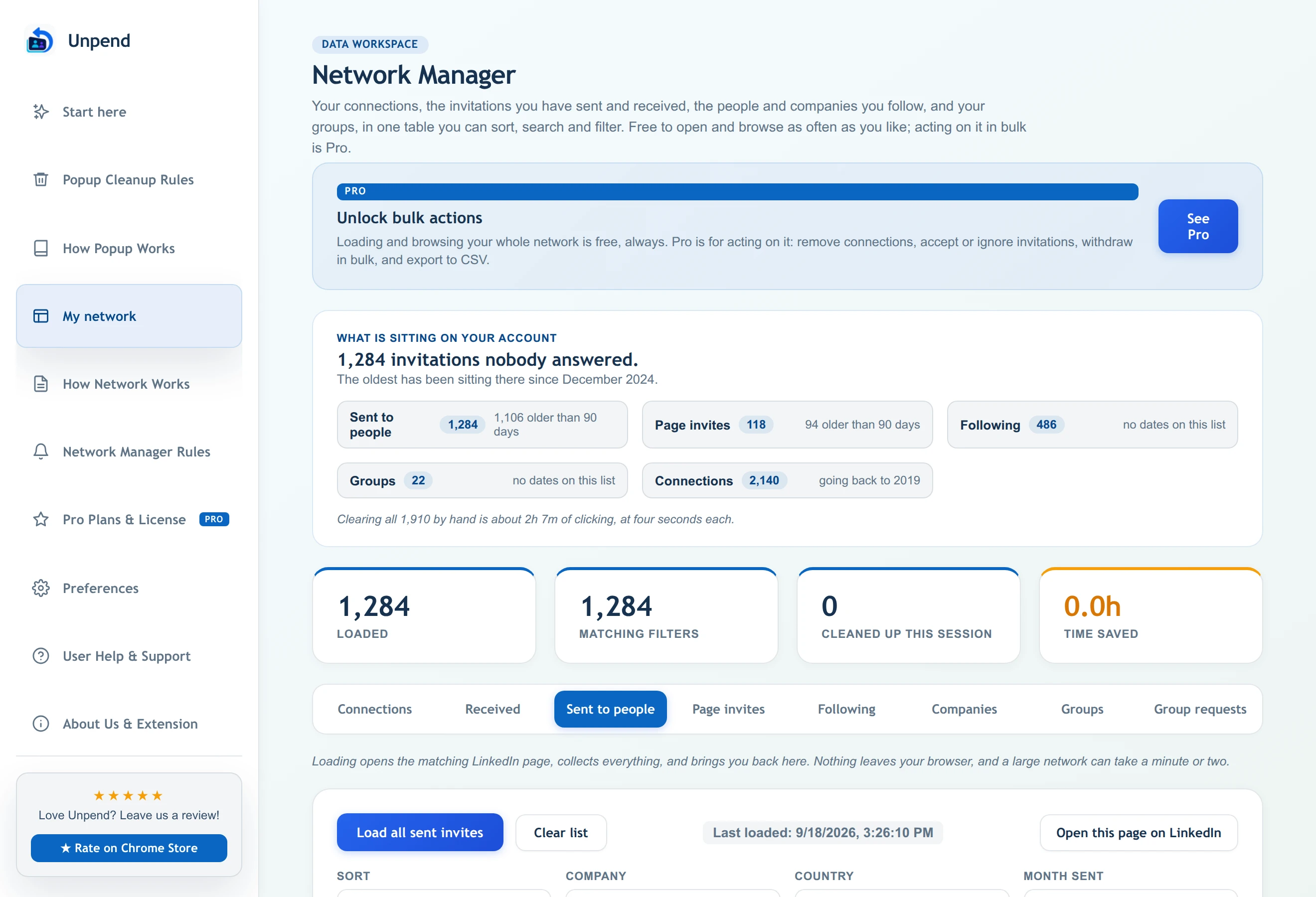
Load every invitation, connection, follow and group into the Network Manager for free. Sort, search and filter by age, then act on just the rows you pick with Pro.
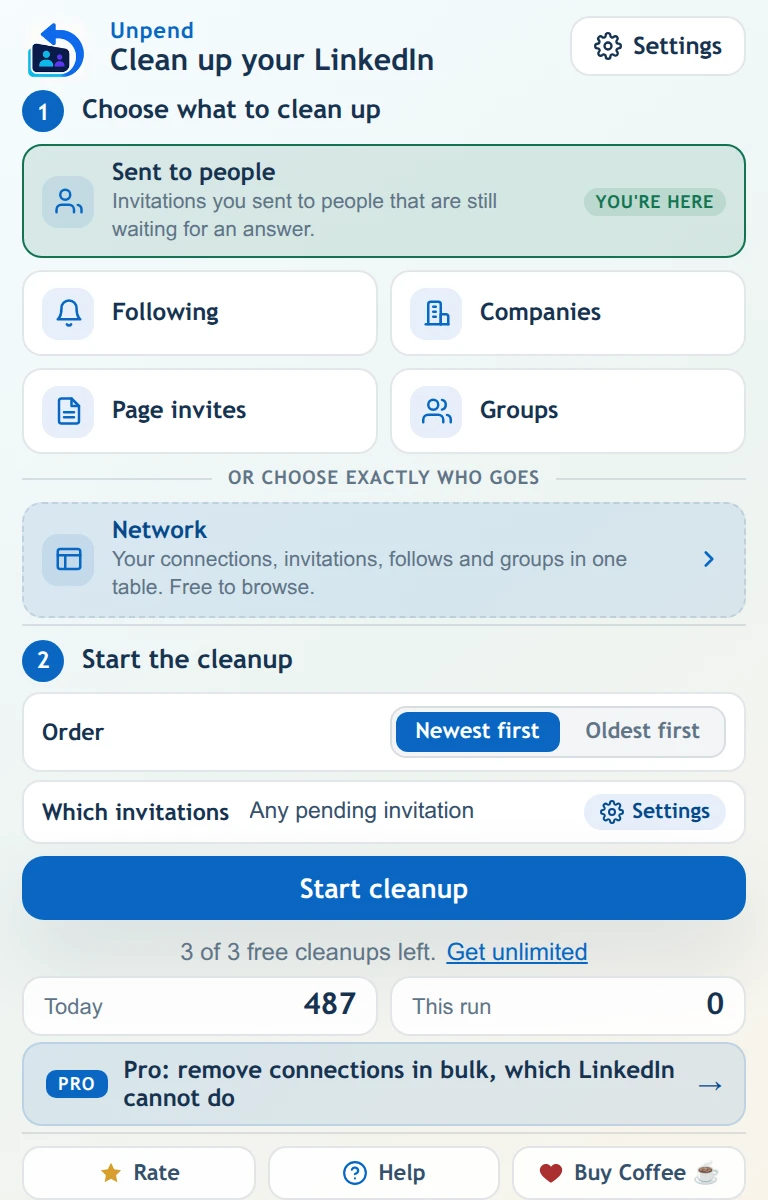
Open the popup on any LinkedIn list, choose everything or only what is older than a number of days, and press start. The counter shows every action as it happens.
The pile that blocks you from re-inviting anyone on it.
Follow requests your company Page sent that nobody answered.
Accept or ignore dozens at once instead of one screen at a time.
Including everyone you follow without a connection and forgot about.
The feed you never chose, made of Pages you followed once.
Leave groups in bulk, and withdraw requests that were never approved.
How a run goes
Invitations you sent to people or from a Page, people and companies you follow, group requests. The popup marks the list you are already on.
Withdraw everything, or only what is older than a number of days you choose. An invitation whose date cannot be read is skipped rather than guessed at, and the run tells you how many.
It clicks every row and confirms every dialog, paced at 25 actions a minute. The counter moves the whole time, including while it is scrolling to reach the first match. Stop it whenever you like.
Built for how you use LinkedIn
Sourcing sends hundreds of invitations a week. Withdraw the unanswered ones before they block your next search, and keep your talent network current.
How recruiters use UnpendOutreach leaves a trail of pending invitations and stale connections. Reset your network before a launch, a fundraise or a new market.
How founders use UnpendMonths of networking leave a pile of pending requests. Clear them in minutes and start your next search with a clean list.
Read the withdrawal guideBefore you install anything
Unpend only removes things you already did. It cannot send an invitation, post, message or follow. That boundary is the product, not a setting.
It works inside your browser on the session you are already signed into. There is no account to make, no password field, and zero network data is ever uploaded to developer servers.
A conservative ceiling of 25 actions a minute with human gaps, and automatic back-off if LinkedIn signals a rate limit. Automation carries platform-policy risks under LinkedIn's User Agreement, so we pace conservatively to minimize patterns.
Withdrawing cannot be undone by us or LinkedIn, and LinkedIn blocks re-inviting the same person for up to 3 weeks. That is why the age filter exists, why Pro has a protect list, and why every bulk action shows you what it is about to do first.
From the Chrome Web Store
“I had over 1600 invitations to withdraw and it would’ve taken me a century to do it manually. So easy to use it is criminal not to have it!”
Franck O., July 2026
“A very good app. Smoothly working 100% recommended.”
Rafaqat A. K., October 2026
“This is what I needed!!”
Esha J., February 2026
Read every review on the Chrome Web Store
Unpend is built and supported by one developer, Abdellatif Embarki, at Isekai NextGen in Morocco. Every support email and every uninstall note is read by the person who wrote the code.
Pricing
150 actions a month are free, forever. Pro removes the limit and adds the bulk tools for connections and received invitations.
About the price of a coffee, monthly, for as long as you want it. Cancel whenever you like, from inside the extension or from the billing portal.
Get Pro monthlySix months of monthly, for a whole year of upkeep.
Get Pro yearlyUnder a year of monthly, then never again. Nothing to cancel.
Get Pro for lifeBuying for a team? Team plans start at $99 a year for 5 people. See team plans
Cancel any time in one click. Team plans for recruiting teams and agencies.
Questions people actually ask
We cannot promise you it will not, and anyone who does is guessing. What we can tell you is what it does: a hard 25 actions a minute, human-length gaps between them, an automatic backoff the moment LinkedIn returns a rate-limit response, and it stops entirely if it sees a checkpoint. It also never sends anything, which is the behaviour LinkedIn actually polices hardest.
No. LinkedIn does not notify anyone when an invitation is withdrawn, whether or not they had already ignored it. The request simply stops being pending.
150 actions a month, renewing on its own for as long as you use Unpend. A run that withdraws nothing never costs anything. All six lists are included, along with the age filter, the order and the per-run limit. Loading and browsing your whole network in the Network Manager is free and unlimited, with no monthly count at all. Pro adds unlimited actions, Auto-Clean reminders, and the bulk actions on connections and received invitations.
No, and neither can LinkedIn. Withdrawing is permanent and it blocks you from re-inviting that person for a few weeks. If you are unsure, start with a high number of days, like 90, and see what it clears before going lower.
Yes. Unpend installs from the Chrome Web Store into Chrome, Edge, Brave and other Chromium browsers, on Windows, Mac, Linux and Chromebooks. In Edge, allow extensions from other stores when it asks. It does not run on phones or tablets, because mobile browsers do not support extensions.
Nothing about your LinkedIn network. Your lists, settings and protect list stay in your browser's own storage. Only these ever leave: a licence check if you activate Pro (your key and an anonymous install ID), whatever you choose to write in a feedback or support form, and, if you uninstall, the version and usage counts on the survey page that opens. Payment details go to Creem, the payment provider, never to us. The privacy policy lists each one.
About forty minutes, and that is deliberate. Every action is paced at a hard ceiling of 25 a minute with human gaps, because going faster is how accounts get flagged. Nothing in the run is slower than that ceiling, so forty minutes is the floor rather than a symptom. You can set a per-run limit and do it in sittings instead.
No. Everything happens on a real LinkedIn page in your browser, so that tab has to stay open and stay on that page. You can use other tabs and other windows freely. If the tab closes, whatever finished is kept and the rest simply stops, and nothing is lost.
The free plan is the trial: every list, every filter and the Network Manager, with 150 actions a month and no card. Upgrade when your backlog is bigger than that, and cancel any time in one click.
In one click from the Pro tab inside the extension, or from the billing portal link in your receipt. Cancelling stops the next renewal and you keep Pro until the end of the period you already paid for. Lifetime has nothing to cancel.
Say so and it might get built. Most of what Unpend does now started as a message from somebody tired of clicking, including the stop button and free browsing in the Network Manager. There is a suggestion form on this site and no account is needed. The one boundary that will not move: Unpend removes things you already did, on a page you are looking at, so anything that sends invitations or runs while you are away is out of scope.
Install it, open the Network Manager, and look at the number before you decide anything. That part costs nothing and takes a minute.
Free plan · 150 actions a month · no card, no account
We use one Google Ads tag to see which ads bring people to Unpend. It sets cookies only if you accept. The extension itself never tracks you. Privacy policy